How I went from zero programming experience to building a 70K-line native email client for Haiku OS — with Claude
Confessions of a vibe coder.

Last year, I stumbled across a post from someone using Claude to develop a native Haiku app. I’d been using Claude’s web interface for some light Drupal work, but the idea of building a real C++ desktop application with it? That sounded wild. So I opened a Claude conversation and started exploring.
I should be upfront: I had never programmed before. I’m a long-time Haiku user and know the OS quite well, but writing C++, or software development for that matter, was completely new to me. My idea was simple — I am a live query junky, and wanted a query-based email viewer that could leverage Haiku’s unique filesystem capabilities (eventually, I called the app EmailViews).
The Claude Web phase
The early days were all in Claude’s web UI. I’d describe what I wanted, Claude would produce code, and I’d compile and test it in Haiku. It was a learning process on both sides — me learning a few things about software development little by little, and Claude learning the specifics of the Haiku API as I fed it relevant documentation from the BeBook, the Haiku API Book, or other relevant information that I would find online (the Hiku forums, and such). Claude actually knew the Be/Haiku API quite well out of the box, but not for the trickier corners, so providing docs made a big difference.
As the codebase grew, though, the copy-paste workflow through the web UI became very tedious. Every conversation had limited context, and I spent more time explaining where we left off than actually building.
Enter Claude Code
Then I saw a post (can’t remember if it was in the Haiku forums, the Haiku Telegram channel or somewhere else) from someone who had gotten Claude Code running directly on Haiku. I reached out, and asked if he would share his setup, which he did in a post on the Haiku forums. I tried this setup, and after a few going back and forth, I got Claude Code running in Haiku.
That was the turning point. Going from copying snippets through a browser to having Claude directly in my development environment, seeing my entire codebase, editing files in place — it was a completely different and much more rewarding experience.
This also allowed me to share the Haiku source tree that I keep on my machine, as well as that of other native Haiku apps that can serve as reference. Whenever Claude gets uncertain about how a particular API is supposed to work, I would point it to the Haiku sources that I thought were relevant. This has been a reliable way to keep Claude grounded in how things actually work rather than how it thinks they might work.
Growing beyond the original vision
EmailViews started as a simple three-pane email viewer built on top of Haiku’s built-in mail daemon and mail kit, and using Haiku’s Mail app to read and compose emails.
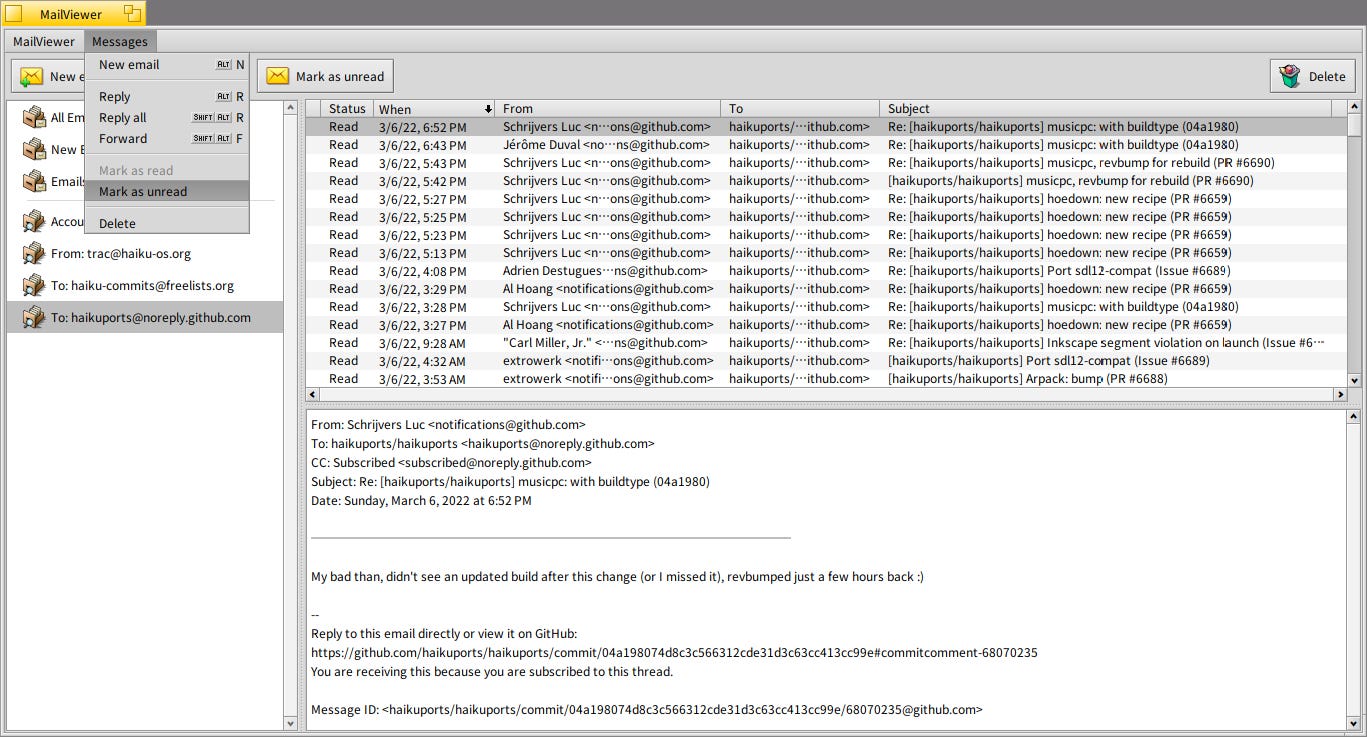
But the project kept evolving. At one point, because I wanted better integration between the viewer and the mail reader/composer, we forked Haiku’s Mail app and adapted it to the viewer’s needs.
One frequent request from Haiku users is the ability to view HTML emails, which no native client in Haiku’s offers yet. We considered our options, and we ended up adopting litehtml. This decision was also influenced by the fact that I had seen a Haiku developer trying to use this library with the goal of adding HTML view capabilities to Haiku’s Mail app. We started with the version of litehtml available in HaikuDepot, but a good number of the HTML emails I tested it on would not render properly; at the beginning Claude was writing preprocessors to work around this rendering issues we kept hitting, but it was getting out of hand. So I decided it made more sense to fix things at the source level, so made a call to fork litehtml. Claude initially pushed back on that idea, but came around once we got into it. That’s something to keep in mind when vibe coding: don’t just accept whatever the AI suggests. You’re making architectural decisions, pushing back, and steering the project.
Eventually we outgrew Haiku’s mail infrastructure entirely. We built our own IMAP daemon based on libetpan and forked a small portion of the mail kit (mostly for parsing).
This is how EmailViews went from a simple query-based email viewer to a fully self-sustained, multi-account IMAP email client with HTML rendering, full IMAP sync, and of course, the much useful file attribute based live queries we have come to love in Haiku. The codebase now sits at around 70,000 lines of C++ across roughly 225 files.


AI is Controversial in the Haiku community
I’ll touch on this briefly and diplomatically: the use of AI-assisted development tools is a topic that generates strong opinions in the Haiku community, as it does in many open source projects. Some community members have reservations about AI-generated code, and I respect that these are sincere concerns about code quality, attribution, and the future of open source contribution. But I also think (well, actually know) that there are also enthusiastic users who would appreciate having a modern native email client on Haiku. I truly hope that over time, the conversation can move from the “I am against, I am in favor” endless bike shedding to more on the quality and usefulness of what’s being built regardless of how it is being built.
What I’ve learned
If you’d told me six months ago that I’d have a 70K-line C++ application to my name, I would have laughed. A few takeaways for anyone thinking about trying something similar:
You don’t need to be a programmer to start. Domain knowledge matters just as much. Knowing Haiku as a user gave me the vision for what the app should be and how it should behave.
Feed Claude documentation. It knows a lot, but niche platforms benefit enormously from you providing current API docs and source code as reference.
Push back on Claude’s suggestions It’s a collaborator, not an oracle. Some of my best decisions came from disagreeing with its initial approach.
Claude Code changes everything. If you’re doing anything beyond a small script, the jump from the web UI to Claude Code is night and day.
I released the initial viewer version of EmailViews back in February, and I am still working on the full IMAP email client version, which I hope to be able to release sooner rather than later. If you use Haiku and want a native email experience, stay tuned. And if you’re curious about using Claude for niche platform development — just try it. You might surprise yourself.